



THEMAP measures how far one chemical dataset is from another. Give it a folder of bioactivity assays and it returns a distance matrix between them — which tells you two useful things: which existing datasets are the best source data to transfer from, and how hard a new assay will be to predict before you spend a GPU-week training on it.
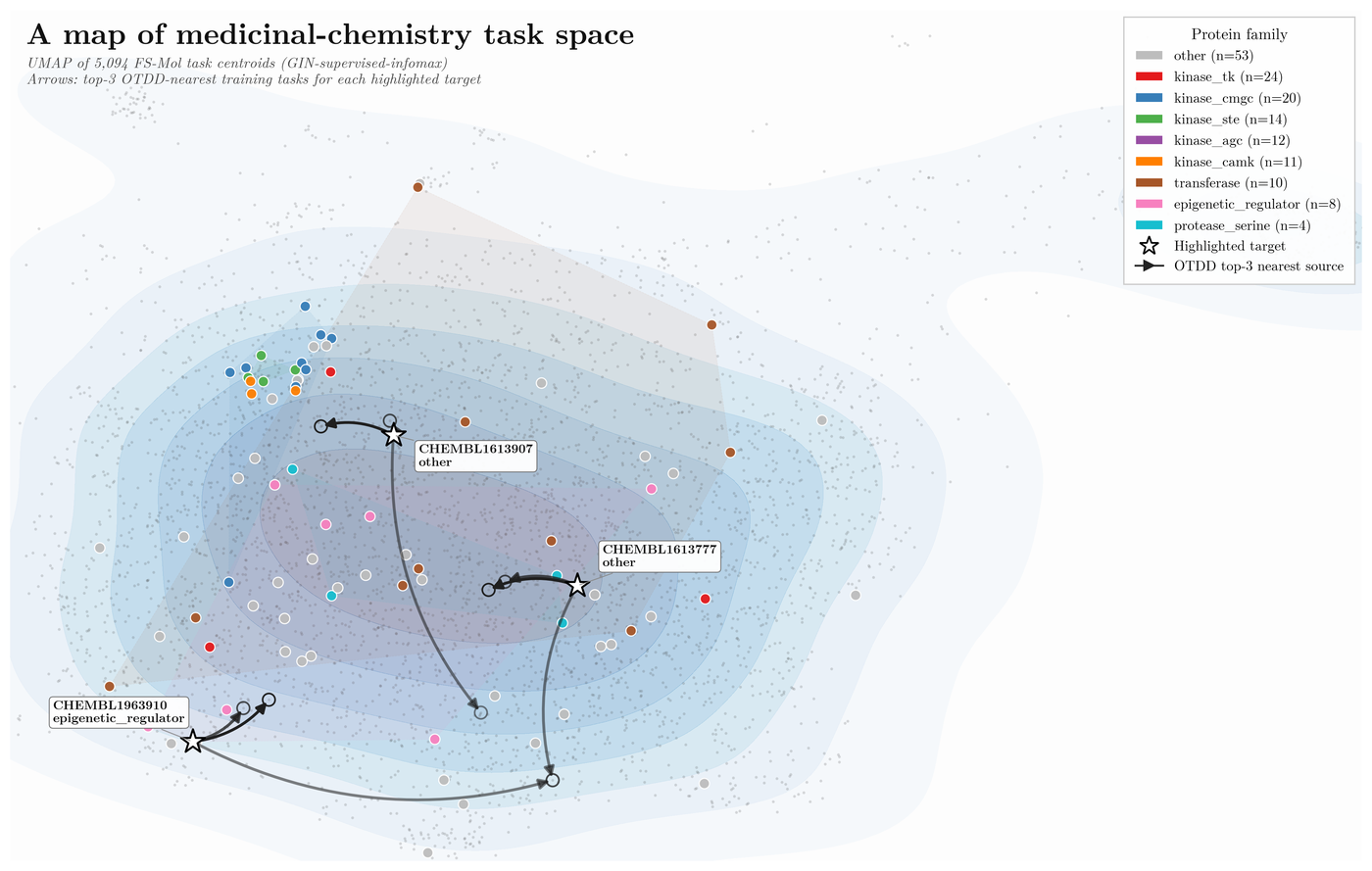
5,094 FS-Mol assays laid out by their chemistry. The arrows — each target to its three nearest source tasks — are the selection THEMAP automates.
pip install themapOther install routes — dev setup, GPU/conda, optional extras
git clone https://github.com/HFooladi/THEMAP.git
cd THEMAP
source install.sh
This installs uv if needed, creates a .venv, installs all
dependencies, sets up the pre-commit hooks, and activates the environment. To reactivate it later:
source .venv/bin/activateHeavy ML dependencies are optional, so pick what you need:
pip install themap                # core: fingerprints, descriptors, euclidean/cosine
pip install -e ".[all]"           # everything (editable)
pip install -e ".[ml]"            # neural featurizers (ChemBERTa, GIN, ...)
pip install -e ".[protein]"       # protein/target featurization (ESM-2, ESM-3)
pip install -e ".[otdd]"          # optimal transport dataset distance
pip install -e ".[dev,test]" # development + testingconda env create -f environment.yml
conda activate themap
pip install -e . --no-deps- Python 3.10 or higher
- A CUDA-capable GPU only if you want OTDD or neural featurizers at scale
The repository ships with 10 source and 3 target ChEMBL assays, so this runs end-to-end on real data with nothing to download:
git clone https://github.com/HFooladi/THEMAP.git && cd THEMAP
pip install themap
themap quick datasets/ -f ecfp -m euclidean -o output/
About 15 seconds later (8 CPU cores, no GPU):
Computing distances from datasets/...
  Featurizer: ecfp
  Method: euclidean
  Workers: 8
  Device: auto
INFO | themap.data.loader | Loading 10 datasets for fold 'train'
...
INFO | themap.data.loader | Successfully loaded 10/10 datasets
INFO | themap.data.loader | Successfully loaded 3/3 datasets
INFO | themap.features.molecule | Featurizing 5323 unique SMILES across 10 datasets
INFO | themap.distance.dataset_distance | Computing 3×10 euclidean distance matrix

Results:
  molecule: 3 x 10 distances

Output saved to: output
output/molecule_distances.csv (5 of 10 source columns shown):
                CHEMBL1023359  CHEMBL1613776  CHEMBL1614274  CHEMBL2218944  CHEMBL2219012  ...
CHEMBL1963831           5.807          2.533          2.645          2.113          2.279  ...
CHEMBL2219236           5.688          2.314          2.070          0.833          0.955  ...
CHEMBL2219358           5.664          2.278          2.020          0.827          0.994  ...
Each row is a target assay from datasets/test/; each column is a candidate source assay
from datasets/train/. Smaller means more similar chemistry, so a better dataset to transfer from
— here all three targets are closest to CHEMBL2218944, and CHEMBL894522 (distance ≈ 8) is the
one you would not train on.
The same thing from Python:
from themap import quick_distance

results = quick_distance(
    data_dir="datasets",          # folder with train/ and test/ subfolders
    output_dir="output",
    molecule_featurizer="ecfp",   # any of 31 molecule featurizers
    molecule_method="euclidean",  # or "cosine", "otdd"
)
# results["molecule"][target_id][source_id] -> floatNo install required — these run on a free Colab runtime.
| Notebook | Covers | Runtime | |
|---|---|---|---|
| 5-minute quick tour | Compute and plot your first distance matrix | CPU |  |
| API deep dive | The building blocks, YAML pipelines, a PCA task landscape | CPU | |
| OTDD deep dive | Optimal transport across three featurizers, and when it beats Euclidean | GPU (T4) | |
The OTDD notebook needs a GPU (a free T4 is enough) because its Wasserstein computation is GPU-bound at any practical scale.
| I want to… | How |
|---|---|
| Pick the best source datasets to fine-tune from | themap quick and take the smallest entry in each row — distance guide |
| Estimate how hard a new assay will be | average the k smallest distances in its row (see Python API below) |
| Compare featurizers or distance metrics | themap featurize datasets/ -f ecfp -f maccs -f desc2D — 31 featurizers |
| Bring the protein target into the distance too | themap run config.yaml with metadata distances — task guide |
| Reproduce the JCIM 2024 paper | see Reproducing the JCIM 2024 paper below |
| Check meta-learning results against FS-Mol | themap fsmol-benchmark — parity benchmark |
Command-line reference — every themap subcommand
After installation the themap command is on your PATH. Every command supports --help, and -v
before a command turns on debug output (themap -v quick datasets/).
themap quick datasets/ -f ecfp -m euclidean -o output/
themap quick datasets/ -f maccs -m cosine -j 4
themap quick datasets/ -f ecfp -m otdd --device cuda # GPU-accelerated OTDDthemap init # write a config.yaml template
themap run config.yaml # run the pipeline
themap run config.yaml -o results/ # custom output directory
themap run config.yaml --molecule-only # skip protein distances
themap run config.yaml -j 4 # parallel workers
themap run config.yaml --device cuda # force GPU; 'auto' is the defaultUseful before running several distance computations over the same data:
themap featurize datasets/ -f ecfp                         # one featurizer
themap featurize datasets/ -f ecfp -f maccs -f desc2D      # several at once
themap featurize datasets/ -f ecfp --fold train            # one fold
themap featurize datasets/test/CHEMBL123.jsonl.gz -f ecfp  # one file
themap featurize datasets/ -f ecfp --force # ignore the cachethemap metalearn datasets/ --distance-file d.csv --target-id CHEMBL123
themap metalearn-compare datasets/ --demo # distance vs random selection
themap fsmol-subset benchmarking_datasets/fsmol_datasets # 20 representative test tasks
themap fsmol-benchmark benchmarking_datasets/fsmol_datasets --device cudathemap convert data.csv CHEMBL123456 # CSV -> THEMAP's JSONL.GZ format
themap convert data.csv CHEMBL123456 --smiles-column SMILES --activity-column pIC50
themap info datasets/ # dataset statistics
themap list-featurizers # 31 molecule + 5 protein featurizersFull reference with all flags: Command Line Interface.
Python API — pipelines, config files, data format, reading the results
from themap import run_pipeline

results = run_pipeline("config.yaml")data:
directory: "datasets"
distances:
molecule:
enabled: true
featurizer: "ecfp"
method: "euclidean"
output:
directory: "output"
format: "csv"themap init writes a fuller template with every option commented.
datasets/
├── train/                        # source datasets
│   ├── CHEMBL123456.jsonl.gz
│   └── ...
└── test/                         # target datasets
    ├── CHEMBL111111.jsonl.gz
    └── ...
Each .jsonl.gz holds one molecule per line:
{"SMILES": "CCO", "Property": 1}
{"SMILES": "CCCO", "Property": 0}
Already have a CSV? themap convert data.csv CHEMBL123456 produces this layout.
Rows are targets, columns are candidate sources:
import pandas as pd

distances = pd.read_csv("output/molecule_distances.csv", index_col=0)

# Best source dataset to transfer from, per target
for target in distances.index:
    row = distances.loc[target]
    print(f"{target} <- {row.idxmin()} (distance: {row.min():.4f})")

# Task hardness: mean distance to the k nearest sources
k = 3
for target in distances.index:
    hardness = distances.loc[target].nsmallest(k).mean()
    print(f"Task hardness for {target}: {hardness:.4f}")
More: Getting Started · Distance Computation · API Reference
Reproducing the JCIM 2024 paper — Zenodo archive + three notebooks
The companion data for "Quantifying the hardness of bioactivity prediction tasks for transfer learning" is on Zenodo (record 10605093): pre-computed OTDD distance matrices, ESM-2 protein embeddings, internal chemical hardness measures and ProtoNet evaluation summaries — everything needed to rebuild the figures without re-running the expensive embedding pipelines.
1. Install dependencies (the notebooks need the optional ml extras):
source install.sh2. Download the archive (~16 GB zipped, ~31 GB extracted — budget ~35 GB free). The script
resumes interrupted downloads, verifies the MD5, extracts into datasets/fsmol_hardness/ and
deletes the zip:
make download-fsmol # or: python scripts/download_fsmol_data.pyFlags: --keep-zip, --force, --no-verify, --dest DIR.
datasets/fsmol_hardness/
├── ext_chem/                         # OTDD distance matrices per molecular featurizer
├── ext_prot/                         # ESM-2 protein-distance matrices (t6_8M ... t36_3B)
├── int_chem/{train,test}/            # internal chemical hardness (RF baselines)
├── embeddings/                       # per-task embeddings behind the OTDD matrices
├── FSMol_Eval_ProtoNet/summary/      # ProtoNet performance per support-set size
└── FSMol_Eval_randomForest/summary/  # random-forest baselines
Manual download (no Python)
mkdir -p datasets/fsmol_hardness
cd datasets
wget -c https://zenodo.org/records/10605093/files/fsmol_hardness.zip
echo "10644660a53d8d106b6883cb53eb1f3b  fsmol_hardness.zip" | md5sum -c -
unzip fsmol_hardness.zip -d fsmol_hardness/
3. Run the notebooks in numeric order (cd notebooks/paper && jupyter lab):
| Notebook | Reproduces |
|---|---|
01_external_chemical_hardness.ipynb |
Chemical-space hardness vs ProtoNet performance, across molecular featurizers |
02_external_protein_hardness.ipynb |
Protein-space hardness vs performance, across ESM-2 model sizes |
03_task_hardness.ipynb |
The combined hardness score vs ProtoNet at support sizes 16/32/64/128 |
Each notebook locates the repository root itself, so it does not matter where you launch Jupyter.
notebooks/paper/README.md
holds the full reproduction contract — data provenance, the pinned release tag, run order and
expected outputs. See also
Reproducing FS-Mol.
The notebooks above consume the precomputed hardness archive. To explore the FS-Mol task files —
how many tasks, how big the assays are, which proteins they target, how hard FS-Mol's own baselines
find them — run
notebooks/research/fsmol_benchmark_explorer.ipynb.
It reads the FigShare FS-Mol download used by
themap fsmol-benchmark — not the Zenodo archive — and needs no GPU.
Development & contributing
git clone https://github.com/HFooladi/THEMAP.git && cd THEMAP
source install.sh          # .venv + all dependencies + pre-commit hooks
python run_tests.py fast   # or: python run_tests.py, run_tests.py coverage
make ci                    # everything CI runs: lint, format, mypy, tests, docs
Contributions are welcome — CONTRIBUTING.md covers the workflow, code standards, commit conventions and the review process.
Full docs at hfooladi.github.io/THEMAP (or mkdocs serve
locally):
- Getting Started — installation through first results
- Distance Computation — choosing a metric and a featurizer
- Command Line Interface — every command and flag
- Tutorials — task objects, caching, performance tuning
- API Reference — data, distance, features, pipeline modules
- FS-Mol Parity Benchmark — the guard against meta-learning regressions
@article{fooladi2024quantifying,
  title={Quantifying the hardness of bioactivity prediction tasks for transfer learning},
  author={Fooladi, Hosein and Hirte, Steffen and Kirchmair, Johannes},
  journal={Journal of Chemical Information and Modeling},
  volume={64},
  number={10},
  pages={4031-4046},
  year={2024},
  publisher={ACS Publications},
  doi={10.1021/acs.jcim.4c00160}
}MIT — see LICENSE. Questions and bugs: issue tracker.