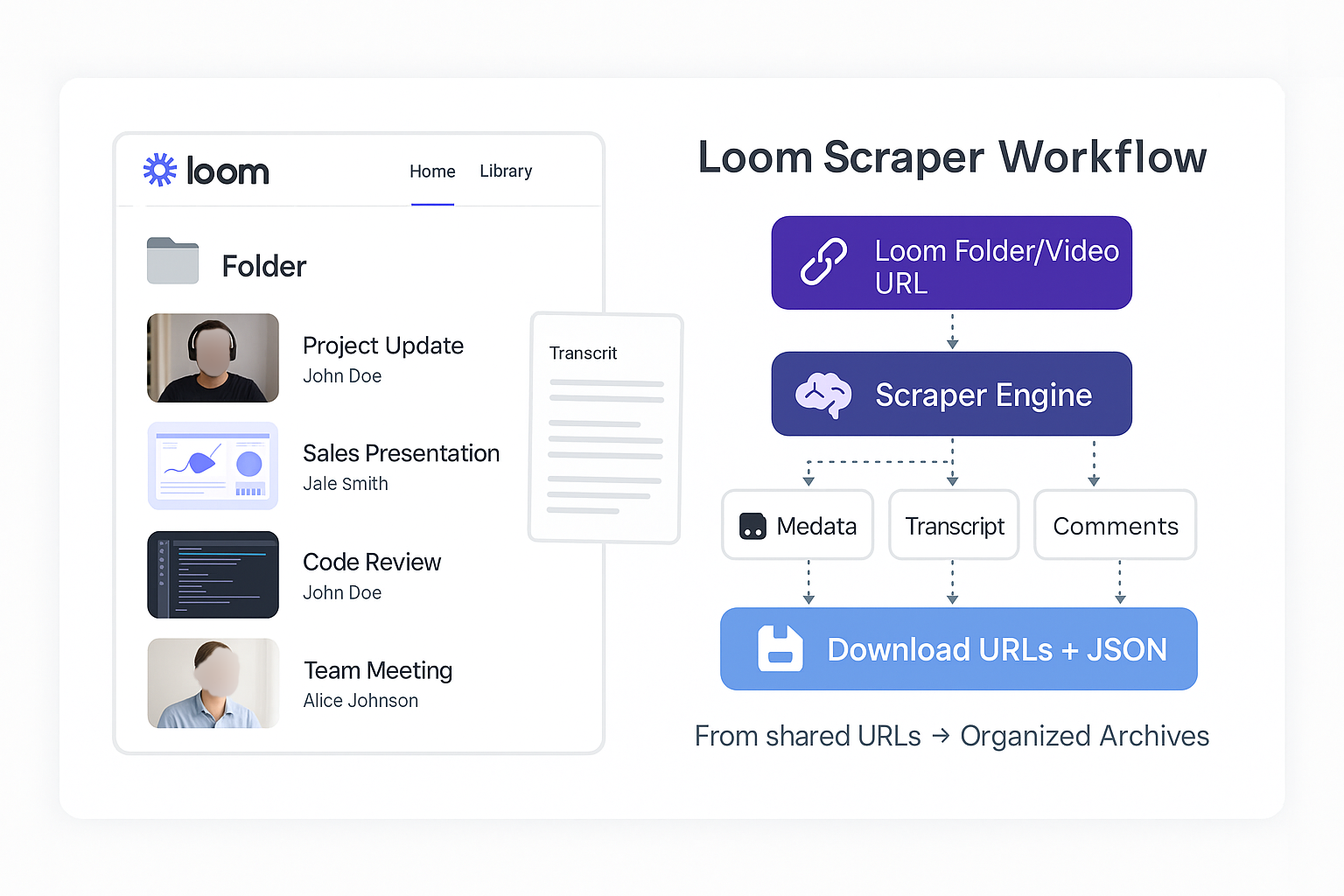
Transform your Loom videos into searchable, downloadable archives with complete metadata, transcripts, and comments across individual videos and entire folders.
Perfect for content creators, educators, and businesses who need to archive, analyze, or repurpose their Loom content without coding complexity.
- Archive online courses and tutorial libraries with searchable transcript databases
- Back up training materials and generate study notes from transcripts
- Create comprehensive knowledge bases from video content
- Archive team presentations, meeting recordings, and video communications
- Generate meeting transcripts for documentation and compliance
- Build searchable knowledge databases from organizational video content
- Bulk download and organize video libraries with rich metadata
- Create searchable video databases with full transcripts
- Repurpose content across platforms efficiently
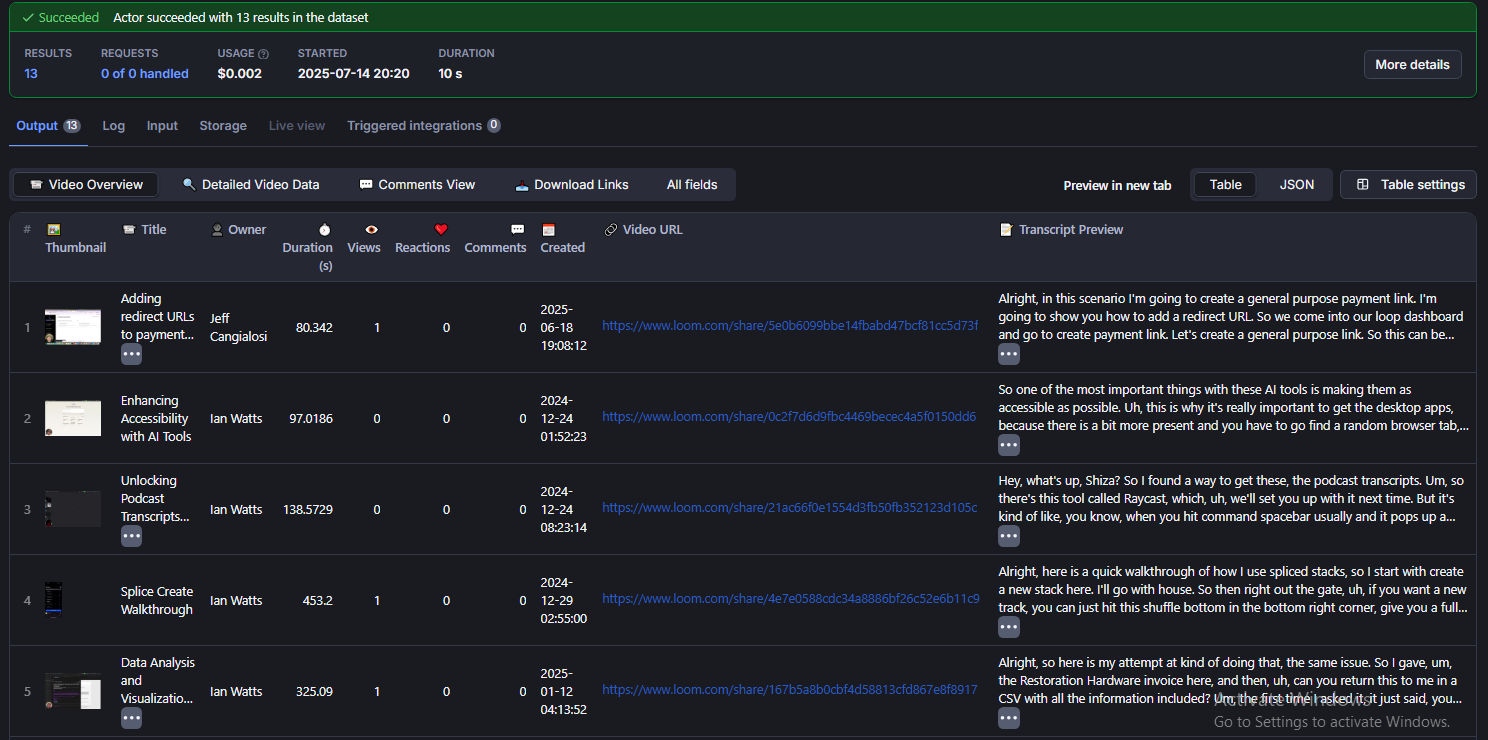
- Metadata: ID, title, description, thumbnails, creation date, duration
- Engagement: Views, reactions, comment count, and every comment with its replies
- Video file: Download as MP4 (HD, with audio), or a direct streaming link
- Creator: Owner name and avatar
- Multiple Formats: SRT, VTT, TXT, XML exports with precise timestamps
- Clean Text: The full transcript text is always included in the results
- Integration: Subtitle files work with video players and analysis tools
- Bulk Processing: Handle entire public folders automatically
- Mixed Operations: Combine individual videos and folders in one request
- Limits: Use
maxVideosto cap how many videos are processed
Paste any of these into url — one per line, mixed freely:
| Link type | Example |
|---|---|
| Share link | https://www.loom.com/share/954d916643754027a3889fd5bf7f24dd |
| Share link with title or tracking | https://www.loom.com/share/My-Demo-Video-954d9166...?sid=... |
| Embed link | https://www.loom.com/embed/954d9166...?hide_owner=true |
| Short link | https://www.loom.com/v/954d9166... |
| Video ID only | 954d916643754027a3889fd5bf7f24dd |
| Folder | https://www.loom.com/share/folder/FOLDER_ID |
The same video listed twice is processed once. Links that are not Loom video or folder links are skipped with a warning in the log.
- Processes all videos from your Loom account
- Supports date filtering (
startDate,endDate) - Supports custom sorting (
videoSortOrder) - Requires your browser cookies (see Authentication)
- Processes only the specific URLs you provide
- Date filters and sort order are ignored
- Public videos need no login at all
- Processes videos in the order you list them
Process individual videos, entire folders, or mixed content:
{
  "url": [
    "https://www.loom.com/share/954d916643754027a3889fd5bf7f24dd",
    "https://www.loom.com/share/folder/FOLDER_ID"
  ]
}- Default:
false - Result: The video file stored in your Apify storage with a permanent download link
- Format: MP4 with audio at the best quality Loom offers (up to 1080p). Some recordings from 2019–2020 exist only as WEBM and are delivered as WEBM (
formattells you which). - How it works: Loom streams most videos in small pieces. The scraper hands the stream to our Universal File Downloader, which joins it into a single MP4 file without re-encoding.
- Speed: Short videos take seconds; a 45-minute video takes about 8 minutes.
- Default:
false - Use Case: Get a video link without storing the file
- Output:
video.download.cdn_url- For most videos this is an HLS playlist (
.m3u8) that plays in VLC, ffmpeg or any HLS player - For older MP4/WEBM recordings it is a direct file link
- For most videos this is an HLS playlist (
⚠️ Note: Links are signed and expire after about 24 hours
How downloadVideo and returnVideoUrl interact:
downloadVideo |
returnVideoUrl |
What happens |
|---|---|---|
false |
false |
No video file or link |
false |
true |
Video link only (no Universal Downloader run) |
true |
false |
Video file stored, with a download link |
true |
true |
Video file stored + the original Loom link in cdn_url |
- Default:
false - Disabled: The clean transcript text is still included in every result
- Enabled: Also stores a subtitle/transcript file with a download link
- Default:
"srt" - Options:
"srt": Standard subtitle format (most compatible)"vtt": Web-friendly subtitles for HTML5 players"txt": Clean text without timestamps"xml": Full structure with metadata
These parameters only work when scraping your own Loom account videos. They have no effect when processing individual video URLs or public folders.
- Format:
"YYYY-MM-DD" - Purpose: Earliest upload date to include from your account
- Format:
"YYYY-MM-DD" - Purpose: Latest upload date to include from your account
- Options:
"ASC": Oldest to newest"DESC": Newest to oldest
- Default:
0.02 - Only used by a rarely needed fallback for private videos, when Loom has to prepare a file first. Public videos never use it. Increase it (e.g.
0.05) only if the log reports a timeout while waiting for Loom to prepare a download.
This Actor needs very little memory. It measured about 50 MB in every test, with or without downloads, because the video work happens in a separate run of the Universal File Downloader. Its memory is fixed between 128 MB and 512 MB (default 256 MB), so you never pay for more than it needs.
Video downloads get their own memory automatically. For each video the scraper estimates the file size and starts the Universal File Downloader with enough memory, capped at your Apify plan's limit:
| Plan | Universal Downloader max | Longest video that fits (typical) |
|---|---|---|
| Free | 4 GB | about 60 minutes |
| Paid | 16 GB | several hours |
If a download still runs out of memory, the scraper retries once with the next memory size. If your plan limit is already reached, the log explains what happened.
Timeout: the default run timeout is 1 hour. When downloading many or very long videos, raise the run timeout in the run options.
Costs: each video download runs the Universal File Downloader in your account, which is billed separately from this Actor. Want to avoid it? Use returnVideoUrl: true and download the link yourself.
📖 Learn more about Apify usage and resources
Public videos and public folders need no authentication.
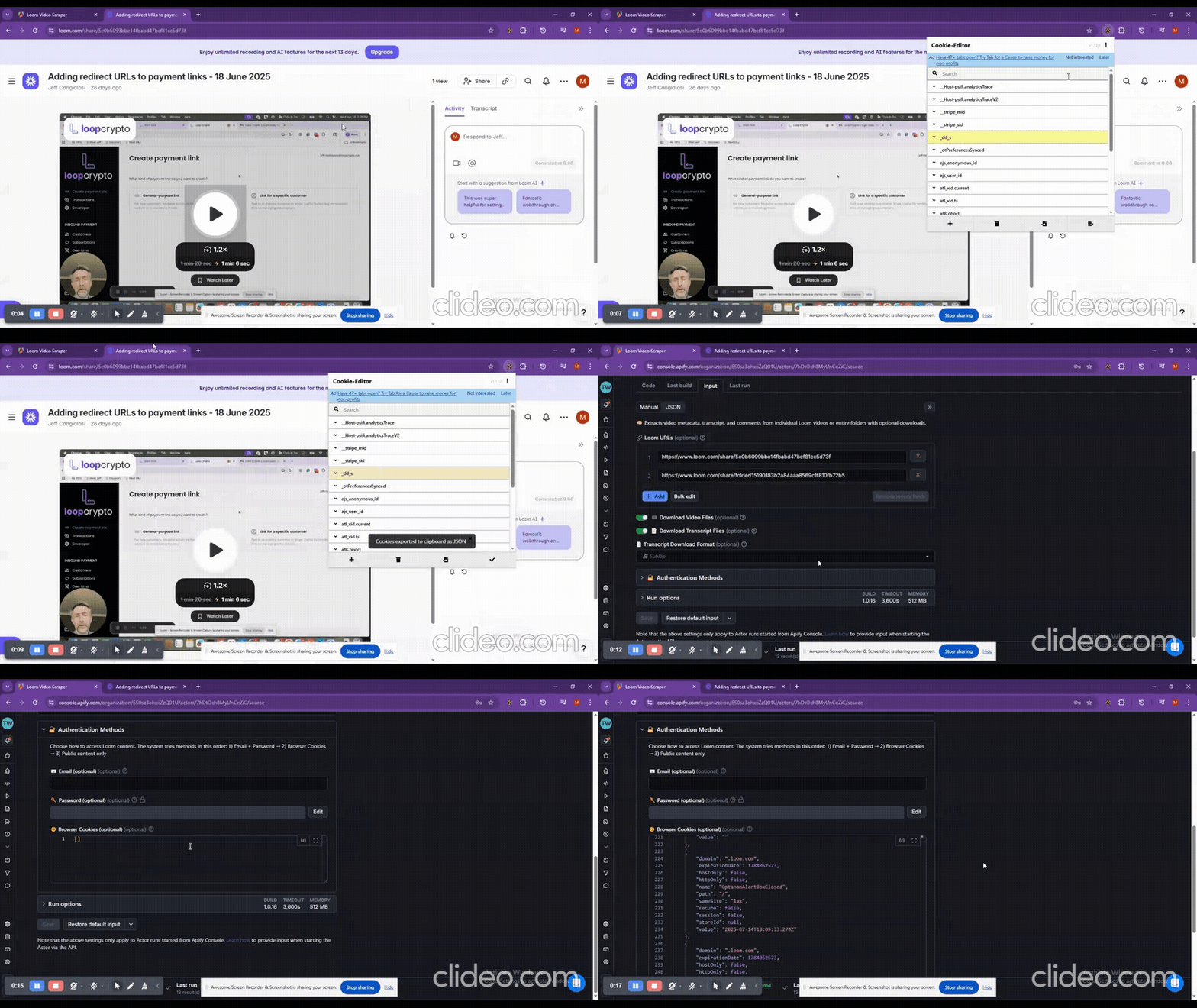
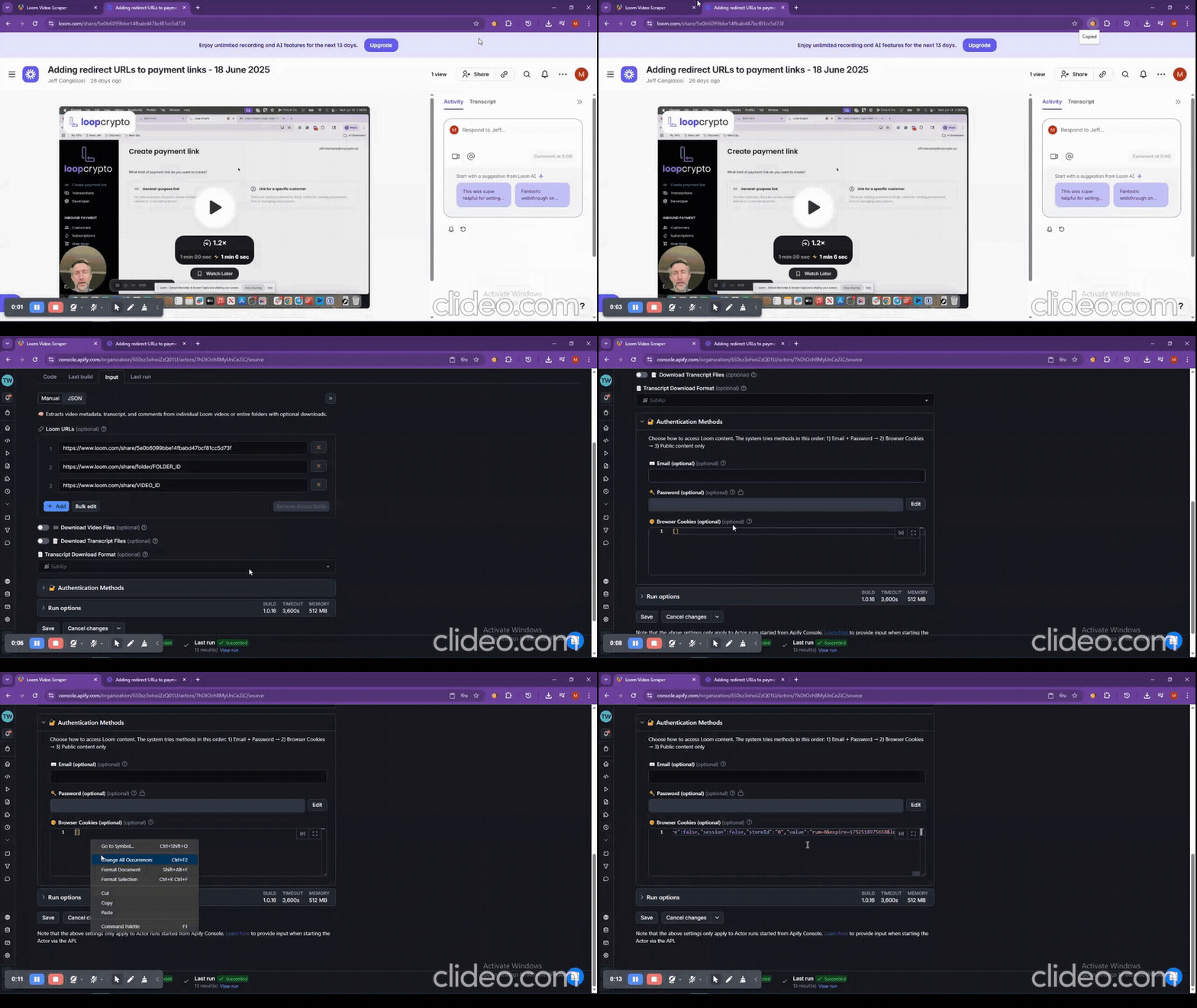
For private or workspace-only videos, and to scan your own library (includeAccountVideos), provide the cookies of a Loom account that can view those videos. The important cookie is connect.sid.
{
  "customCookies": [
    {
      "name": "connect.sid",
      "value": "s%3A123abc...",
      "domain": ".loom.com",
      "path": "/",
      "secure": true,
      "httpOnly": true
    }
  ]
}- Install Extension:
| 🍪 Cookie-Editor Extension | 📋 Copy Cookies Extension |
|
|
- Export Process:
- Go to loom.com and log in
- Use the extension to export your cookies as JSON
- Paste them into
customCookies
If private videos stop working, export fresh cookies — logging out of Loom invalidates them.
- Encrypted at rest:
customCookiesis a secret input. Apify stores it encrypted and it is only decrypted inside your run. - Never logged or returned: cookie values are never written to the log (not even in debug mode), the dataset, or any stored file.
- Only sent to Loom: cookies are used only for requests to loom.com. Video files are fetched with Loom's signed links, so your cookies are never passed to the Universal File Downloader.
- Revoke any time: logging out of Loom in the browser you exported from ends that session.
{
  "video": {
    "id": "954d916643754027a3889fd5bf7f24dd",
    "title": "Product Demo",
    "description": "A quick tour of the new feature.",
    "url": "https://www.loom.com/share/954d916643754027a3889fd5bf7f24dd",
    "thumbnails": "https://cdn.loom.com/sessions/thumbnails/...",
    "created_at": "2025-07-11T09:47:40.065Z",
    "duration_seconds": "2m 3s",
    "views": 120,
    "reactions": 7,
    "comments_count": 2,
    "owner": "Jane Doe",
    "avatars": "https://cdn.loom.com/avatars/...",
    "download": {
      "available": true,
      "url": "https://api.apify.com/v2/key-value-stores/xxx/records/video-Product_Demo_954d9166...mp4?signature=abc",
      "direct_download": null,
      "cdn_url": "https://luna.loom.com/id/954d9166.../resource/hls/playlist.m3u8?Policy=...&Signature=...",
      "format": "mp4"
    }
  },
  "transcript": {
    "text": "Alright, this is the new feature. So what does it do...",
    "download": {
      "format": "SRT",
      "url": "https://api.apify.com/v2/key-value-stores/xxx/records/transcript-Product_Demo_954d9166....srt",
      "available": true
    }
  },
  "comments": [
    {
      "id": "100664080",
      "username": "John Smith",
      "content": "Great walkthrough!",
      "created_at": "2025-07-11T10:58:55.610Z",
      "replies": [
        {
          "id": "100664112",
          "username": "Jane Doe",
          "content": "Thanks!",
          "created_at": "2025-07-11T11:02:10.000Z"
        }
      ]
    }
  ]
}video.download.available is true only when the file was actually stored. Otherwise video.download.error explains why:
error |
Meaning |
|---|---|
NO_VIDEO_FILE |
Loom has no playable file for this video (never finished processing, or the source was removed) |
PRIVATE_VIDEO |
The video is private: add cookies from an account that can view it |
DOWNLOAD_FAILED |
The link was found but the file could not be stored (see the log) |
BUDGET_LIMIT |
Your maximum run cost was reached, so the file was not downloaded |
Deleted and password-protected videos are skipped with a clear message in the log.
{
  "url": [
    "https://www.loom.com/share/954d916643754027a3889fd5bf7f24dd"
  ],
  "downloadTranscript": true,
  "outputFormat": "srt"
}{
"url": [
"https://www.loom.com/share/folder/FOLDER_ID"
],
"downloadVideo": true,
"downloadTranscript": true,
"outputFormat": "srt"
}{
"includeAccountVideos": true,
"downloadTranscript": true,
"outputFormat": "srt",
"startDate": "2024-01-01",
"endDate": "2024-12-31",
"videoSortOrder": "DESC",
"customCookies": [
{ "name": "connect.sid", "value": "s%3A123abc...", "domain": ".loom.com", "path": "/" }
]
}{
"url": [
"https://www.loom.com/share/954d916643754027a3889fd5bf7f24dd",
"https://www.loom.com/share/folder/FOLDER_ID"
],
"includeAccountVideos": true,
"downloadTranscript": true,
"outputFormat": "vtt",
"startDate": "2024-06-01",
"videoSortOrder": "DESC",
"customCookies": [
{ "name": "connect.sid", "value": "s%3A123abc...", "domain": ".loom.com", "path": "/" }
]
}{
"url": [
"https://www.loom.com/share/954d916643754027a3889fd5bf7f24dd"
],
"returnVideoUrl": true,
"downloadVideo": false,
"downloadTranscript": true,
"outputFormat": "txt"
}Returns a playable link in video.download.cdn_url (HLS .m3u8 for most videos), valid for about 24 hours. Open it in VLC, or save it with ffmpeg -i "<link>" -c copy video.mp4.
- Resume: Interrupted runs continue where they stopped, without repeating finished videos
- Error Handling: One failing video never stops the rest of the run
- Long videos: Downloads of 45+ minute recordings are monitored until they finish
- Detailed Logging: Every video's outcome, and a link to each download run
- All Loom formats: Current HD streams, older MP4 recordings and 2019–2020 WEBM recordings
- Batch Operations: Folders and account libraries processed video by video
- Organized files: Video and transcript files are named after the video title
- Export fresh cookies from a browser where you are logged in to Loom
- Make sure that Loom account can open the video in the browser
- Check that
connect.sidis among the pasted cookies
- Empty transcript: Loom has no transcript for that video (no speech, transcription turned off by the owner, or an unsupported language)
- Private videos: Require cookies from an account with access
- Password-protected videos: Not supported yet
- Run timed out: Raise the run timeout (default 1 hour) when downloading many or long videos
- Out of memory on a download: The video may be too large for your plan's limit. Free plan users can upgrade their plan, or use
returnVideoUrl: trueand download the link yourself - Large folders: Use
maxVideos, or split them into smaller batches
- YouTube Transcript Extractor - Extract transcripts with timestamps
- YouTube Scraper Pro - Complete channel and playlist extraction
- Zoom Scraper - Download recordings and transcripts
- Universal File Downloader - Download any file, convert HLS streams to MP4
- Idealista Scraper API - Spanish property data with API
- Idealista Scraper - Real estate listings extractor
- Screenshot - Fast webpage screenshots
- Ultimate Screenshot - Advanced screenshot tool
- Network Security Scanner - Security vulnerability scanner
- Facebook Ads Scraper Pro - Extract Facebook ads data
- 🌐 Website: flowextractapi.com
- 📧 Email: flowextractapi@outlook.com
- 💬 GitHub: FlowExtractAPI
- 💼 LinkedIn: flowextract-api
- 🐦 X: @FlowExtractAPI
- 📱 Facebook: flowextractapi
- 🎵 TikTok: @flowextractapi
- Extracts publicly available data only, plus private content you are authorized to view with your own cookies
- Respects the source site's rate limits and terms
- Does not store personal information beyond what each run returns to you
- Suitable for commercial use
- No affiliation with or endorsement by Loom or Atlassian is implied.
Loom Scraper — by FlowExtract API. Turn any website into structured data.