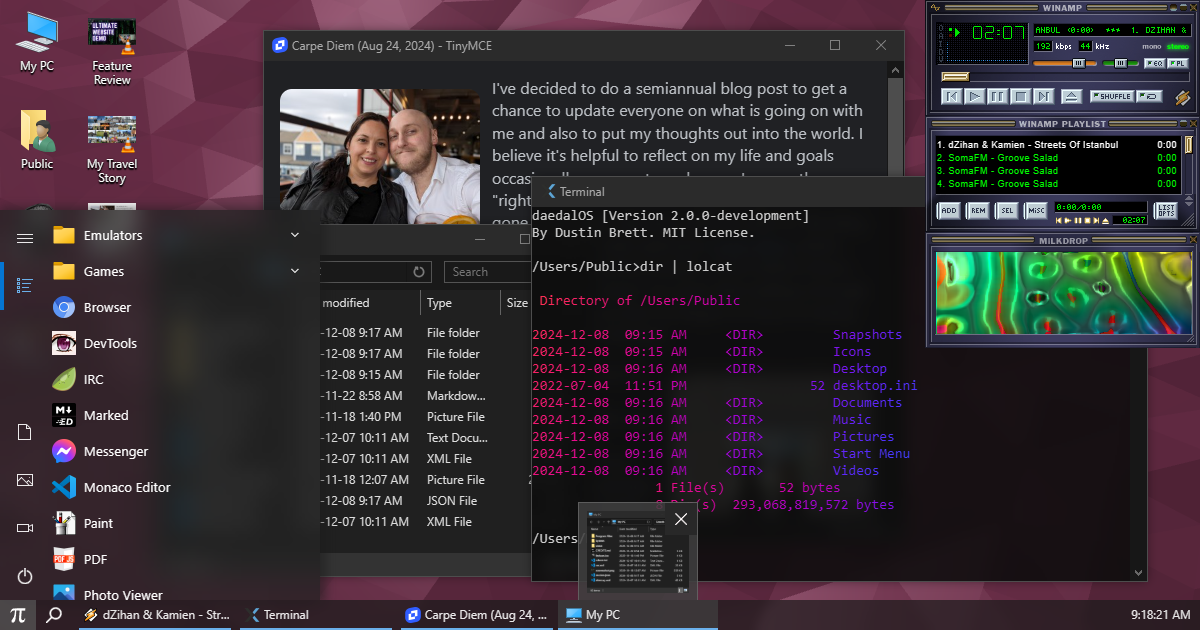

- File Explorer
- Back, Forward, Recent locations, Up one level, Address bar, Search
- Thumbnail & Details Views
- Drag & Drop File Support (internal & external)
- Loading progress dialog
- Archives
- Writes to IndexedDB
- Group selection/manipulation & drag to sort/arrange
- Sort by name, size, type or date
- Persists icon position/sort order
- Dynamic and auto cached icons for music, images, video & emulator states
- Context Menus
- Cut, Copy, Create shortcut, Delete, Rename
- Add file(s), Map directory
- Open with options/dialog, Open file/folder location, Open in new window, Open Terminal here
- Download, Add to archive, Extract here, Set as wallpaper, Set as mouse pointer, Convert audio/video/photo/spreadsheets, Properties (w/Details)
- Sort by, New Folder, New Text Document
- Screen Capture
- Keyboard Shortcuts
- CTRL+A, CTRL+C, CTRL+X, CTRL+V, Delete (or CTRL+D)
- F2 (Rename), F5 or CTRL+R (Refresh), Backspace (Up one level)
- Arrows, Home, End, Enter (Open), ALT+Enter (Properties), ALT+N (New window)
- CTRL+SHIFT+3 (Thumbnail view), CTRL+SHIFT+6 (Details view)
- File information tooltips
- Resizable and Draggable
- Minimize, Maximize & Close
- Persists size/position/maximized states
- Animates opening and closing
- Expandable Sidebar
- Apps list, Documents/Pictures/Videos shortcuts, Power (clears session)
- Spotlight visual effect
- Folder support
- Opens with SHIFT+ESC (or the Windows key in fullscreen)
- Peek hover preview of windows
- Focused window indicator
- Search menu (w/Recent files)
- AI Chat Agent (Prompt API & WebLLM) (w/Summarize & Image Generation)
| Shortcut | Action |
|---|---|
| SHIFT+ESC | Start Menu |
| SHIFT+CTRL+E | File Explorer |
| SHIFT+CTRL+R | Run dialog |
| SHIFT+CTRL+S | Search |
| SHIFT+CTRL+X | Start button context menu |
| SHIFT+CTRL+D | Show desktop |
| SHIFT+CTRL+Up / Down | Maximize / Minimize (or restore) |
| SHIFT+F5 | Reload |
| SHIFT+F10 | Terminal |
| SHIFT+F12 | DevTools |
| CTRL+ALT+F4 | Close focused window |
| F11 | Toggle fullscreen |
In fullscreen the Windows key opens the Start Menu, Windows key combos work in place of SHIFT+CTRL (e.g. Windows Key + R), ALT+F4 closes the focused window and ESC exits fullscreen.
- Runs in a Web Worker
- Drawn in an OffscreenCanvas
- NTP server time mode (ntp.js)
- Synced to system clock on load
- Date tooltip
- Calendar popup
- Dynamic animated wallpapers (OffscreenCanvas/Web Worker)
- Milky Way (density wave theory, device orientation parallax)
- Vanta Waves
- Hexells
- Matrix (2D & 3D)
- Coastal Landscape
- Set via image/video (Fill, Fit, Stretch, Tile, Center)
- Picture Slideshow
- Online image sources
- AI generated wallpapers via Stable Diffusion (requires WebGPU)
- Screen saver file support (.xscr)
- 3D FlowerBox
- 3D Maze
- 3D Pipes
- Hackers
- Launch apps by alias or paths
- Opens
ipfs://&nostr:URIs
- Query parameter loading
- Examples:
/?url=/CREDITS.md/?app=Browser
- Examples:
BoxedWine (.exe, .zip)
- Runs 16/32-bit Windows applications
- Loads websites (w/CORS support)
- Bookmark bar with favicon support
- Proxy support (Wayback Machine & The Old Net)
- Back/Forward & Reload
- Google search via Address bar
- IPFS protocol support
- chrome://dino game
- Fruit fly pets driven by a live spiking simulation of 9,907 real FlyWire connectome neurons, with escape, backward retreat, grooming, sleep & circadian rhythm
- Every fly has its own brain & senses: window edges are walkable terrain, dragged windows & the cursor loom, clicks swat, and a takeoff startles nearby flies
- Flies learn: swat one while it is watching something and it learns to avoid that thing
- Spawn via
fly [count](up to 5) in Terminal or the Run dialog, seefly helpfor details
- Console, Elements, Network, Resources, Sources, DOM
- Activate from Start Menu or SHIFT+F12
EmulatorJS (.32x, .a26, .a52, .a78, .gb, .gba, .gbc, .gen, .gg, .j64, .jag, .lnx, .n64, .nds, .nes, .ngc, .ngp, .pce, .sfc, .smc, .smd, .sms, .v64, .vb, .vboy, .ws, .wsc, .z64)
- Plays console game ROMs
- Internet Relay Chat Client
- Connects over WebSockets
js-dos (.exe, .jsdos, .zip)
- DOS emulator
- Automatic save states on close
- /Users/Public/Snapshots
- Automatic window resize
Marked (.md)
- Markdown Viewer
- Encrypted direct messaging client
- Utilizes Nostr Protocol (NIP-17, NIP-04 for older clients)
- Automatic public/private key creation
- Sign in with a NIP-07 extension or nsec
- Message requests, spam folder, bulk delete & blocking
- Default contacts from the author npub & the site's
/.well-known/nostr.json(NIP-05)
- Code/text editor
- Supports all file types
- Save files via CTRL+S
- Line count, cursor position, language id
- Prettier formatting
- JSON, JS/TS, CSS/Sass/Less, HTML, Markdown, XML
OpenType (.otf, .ttf, .woff)
- Font viewer
Paint (.bmp, .gif, .ico, .jpeg, .jpg, .png, .tif, .tiff, .webp)
- Create & edit images
PDF (.pdf)
- Render/Print PDFs
- Page current/count & Zoom
- Supported Formats
- HEIF (.heic, .heif)
- JPEG XL (.jxl)
- QOI (.qoi)
- TIFF & RAW (.tif, .tiff, .cr2, .dng, .nef)
- Cursors (.ani, .cur)
- Fullscreen & Zoom
Ruffle (.swf, .spl)
- Flash Player emulator
- Creates 512x512 images using artificial intelligence
- Runs locally using WebSD (requires WebGPU)
- Activate from Start Menu or SHIFT+F10
- File system support
- Autocomplete & history
- Pipe commands together
- Command list via
help - Git support (checkout & clone)
- Python support (.py)
- JavaScript support via
qjs - WebAssembly Package Manager (.wasm)
- Ex:
wapm cowsay moo(#)
- Ex:
- FFmpeg & ImageMagick conversion
- Weather information
- eSheep
- Neofetch
- Boots Linux in Virtual x86 via
linuxorwsl
TIC-80 (.tic)
- Runs "fantasy computer" games
TinyMCE (.rtf, .whtml)
- Read & WYSIWYG modes
- File save support
Virtual x86 (.bin, .dsk, .img, .iso)
- x86 emulator
- Automatic save states on close
- /Users/Public/Snapshots
- Automatic window resize
- Supported Formats (.mp4, .webm, .mkv, .mov, .m4v, .ogv, .3gp, .m3u8, etc.)
- AVI/DivX decoded via codecbox.js
- Plays YouTube videos/shortcuts
- Keyboard Shortcuts (Volume, Seek, Scale, Fullscreen)
- Code/text editor
- Supports all file types
Webamp (.mp3, .wsz, .asx, .m3u, .pls)
- Winamp audio player
- Skin support (w/random skins via Winamp Skin Museum)
- Playlist & streaming support
- Visualization support ("Milkdrop")
Chess (.pgn)
- Play against stockfish.js, a friend, or watch CPU vs CPU
- Load PGN games w/move navigation
- Minecraft Classic compatible client
- Block breaker arcade game like Arkanoid
- Reverse engineering of 3D Pinball from Windows
- Port of the classic first-person shooter
build:prebuild generates the file system and search indexes the app loads at startup, so re-run it after adding or removing files in public/.
yarn install
yarn build:prebuild
yarn dev
Then open http://localhost:3000.
Builds a static export to out/ and serves it on http://localhost:3000.
yarn install
yarn build
yarn servedocker build -t daedalos .
docker run -dp 3000:3000 --rm --name daedalos daedalosyarn test # Jest unit tests
yarn e2e # Playwright end-to-end tests (run `yarn playwright install` once first)
yarn lint # Oxlint